

Capabilities
Pipecat’s Gemini Live integration supports multiple modalities and deployment targets:Voice
Real-time speech-to-speech conversations with natural turn-taking and voice activity detection
Vision
Process video and screenshare alongside audio for multimodal interactions
Telephony
Build phone-based voice agents with Twilio WebSocket integration
Tool Use
Function calling support for external integrations and dynamic responses
Architecture
Pipecat manages connections between your client and Gemini Live: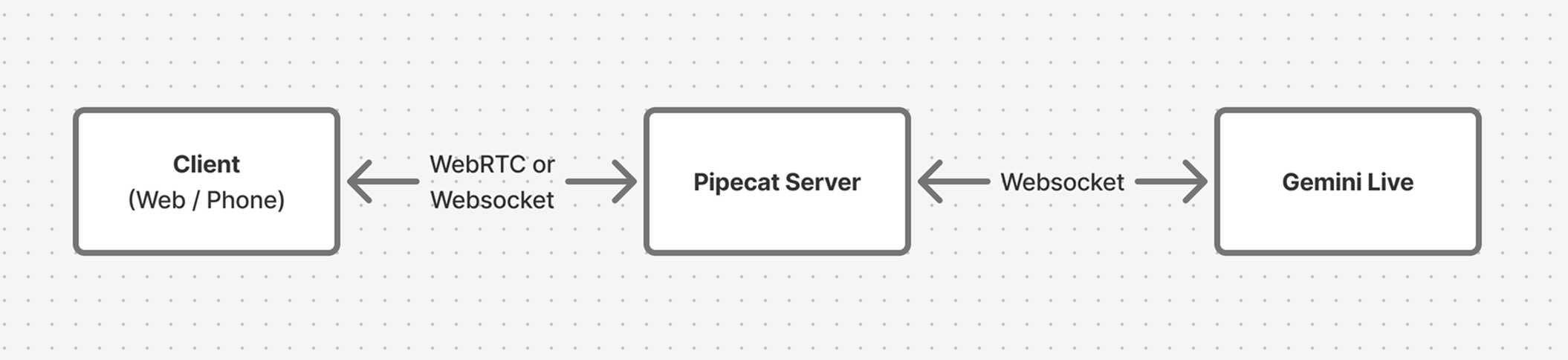
Quick Start
The fastest way to start building is with the Pipecat CLI:- Bot type: Gemini Live (speech-to-speech)
- Transport: Daily WebRTC, Twilio, or others
- Deployment target: Local development or Pipecat Cloud
Starter Projects
These complete examples demonstrate Gemini Live in production scenarios. Each includes local development setup and Pipecat Cloud deployment configuration.Phone Bot (Twilio)
A telephone-based voice agent using Gemini Live with Twilio WebSockets. The demo plays “Two Truths and a Lie” to showcase natural conversation flow.Phone Bot Starter
Build a production phone agent with Twilio integration
- Twilio WebSocket transport configuration
- Google STT/TTS integration alongside Gemini Live
- TwiML setup for incoming calls
- Pipecat Cloud deployment with telephony
Web Bot (Vision)
A browser-based agent with screensharing and vision capabilities, built with the Pipecat Voice UI Kit and Daily WebRTC transport.Web Bot Starter
Build a web agent with vision and screensharing
- Daily WebRTC transport for web clients
- Vision/screenshare processing with Gemini Live
- Next.js client with Voice UI Kit components
- Resizable panels and event logging
Deployment
Both starter projects include configuration for Pipecat Cloud, which handles scaling, monitoring, and global deployment.pcc-deploy.toml file with sensible defaults for agent configuration and scaling.
Pipecat Cloud Deployment
Learn more about deploying to production